Blog
Writing Umlaute with Capslock + [a,o,u,s] for Mac, Linux and Windows
Mac
Go to the system settings and change the Capslock behaviour to Option/Alt:
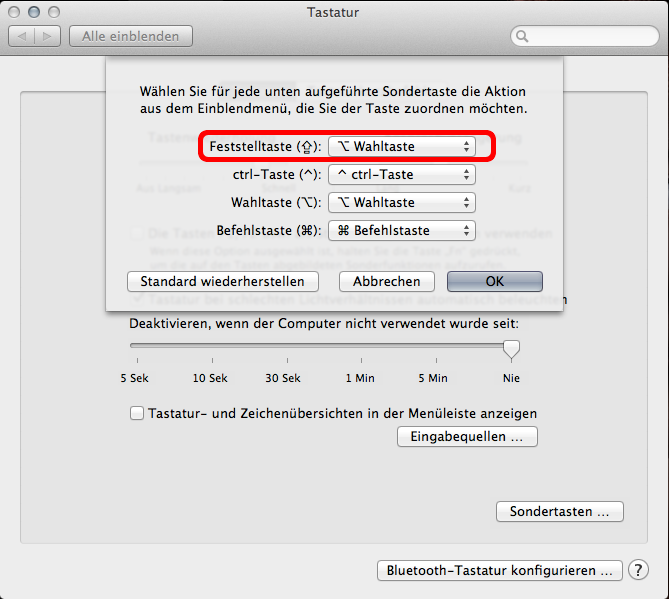
Now download the following software:
Linkhttp://pqrs.org/macosx/keyremap4macbook/
Go to system settings --> keyremap4mac --> Misc & Uninstall --> Open private.xml
Then insert the following:
<?xml version="1.0"?>
<root>
  <item>
    <name>Myzinsky Umlaute</name>
    <appendix>Umlaute accesible with CAPSLOCK + aeiou</appendix>
    <identifier>private.myzinsky.umlaute</identifier>
    <autogen>
      --KeyToKey-- KeyCode::O, ModifierFlag::OPTION_L | VK_SHIFT | ModifierFlag::NONE,
      KeyCode::U, ModifierFlag::OPTION_L, KeyCode::O, VK_SHIFT
    </autogen>
    <autogen>
      --KeyToKey-- KeyCode::O, ModifierFlag::OPTION_L | ModifierFlag::NONE,
      KeyCode::U, ModifierFlag::OPTION_L, KeyCode::O
    </autogen>
    <autogen>
      --KeyToKey-- KeyCode::A, ModifierFlag::OPTION_L | VK_SHIFT | ModifierFlag::NONE,
      KeyCode::U, ModifierFlag::OPTION_L, KeyCode::A, VK_SHIFT
    </autogen>
    <autogen>
      --KeyToKey-- KeyCode::A, ModifierFlag::OPTION_L | ModifierFlag::NONE,
      KeyCode::U, ModifierFlag::OPTION_L, KeyCode::A
    </autogen>
    <autogen>
      --KeyToKey-- KeyCode::U, ModifierFlag::OPTION_L | VK_SHIFT | ModifierFlag::NONE,
      KeyCode::U, ModifierFlag::OPTION_L, KeyCode::U, VK_SHIFT
    </autogen>
    <autogen>
      --KeyToKey-- KeyCode::U, ModifierFlag::OPTION_L | ModifierFlag::NONE,
      KeyCode::U, ModifierFlag::OPTION_L, KeyCode::U
    </autogen>
    <autogen>-
       -KeyToKey-- KeyCode::S, ModifierFlag::OPTION_L | ModifierFlag::NONE,
       KeyCode::S, ModifierFlag::OPTION_L
    </autogen>
  </item>
</root>
Reload the XML and activate this profile, now you can write an Ü with: [caps] + [shift] + [u] and an ß with [caps] + [s]
Update: You can also use BetterTouchTool nowadays.
Linux
Under Linux it is much easier:
create the .Xmodmap file in your home and insert:
keycode 66= Mode_switch Multi_key
keycode 39= s S ssharp
keycode 38= a A adiaeresis Adiaeresis
keycode 30= u U udiaeresis Udiaeresis
keycode 32= o O odiaeresis Odiaeresis
keycode 26= e E EuroSign EuroSign
Windows
Under Windows the the tool AutoHotKey can be used:
#SingleInstance force

#InstallKeybdHook

SetCapslockState, AlwaysOff

CapsLock & a::CSend("ä", "Ä")
CapsLock & u::CSend("ü", "Ü")
CapsLock & o::CSend("ö", "Ö")
CapsLock & e::CSend("€")
CapsLock & s::CSend("ß")

CSend(p_normal, p_shifted="") {
	key:=(!GetKeyState("Shift") ? p_normal:p_shifted)
	Send, %key%
}
Source: JSLover